Using the Windows setup, there is no need to format the partition with an command like FORMAT C: before you setup Windows. The formatting can be done during the Windows setup right after the partition to install Windows on has been chosen. In Windows XP you are asked to format the primary partition in NTFS or FAT32 (select the more stable NTFS), while Windows Vista uses the NTFS file system by default. You can choose between a quick format and a complete format, in most cases the quick format will do. If there are problems during setup, rerun the setup procedure and choose for a complete format.
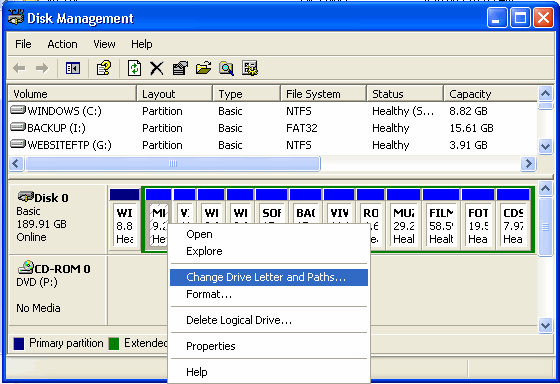
Formatting Logical Disks (partitions within the extended partition) is easy. Right click the partition using the Windows Explorer or Disk Manager as shown below (Control Panel, Administrative Tools, Computer Management, Disk Management) and select Format. In Windows XP you will be asked what file system (FAT32 or NTFS) to format, the preferred label and the option to quick format the disk. If there is no reason to use FAT32, select the NTFS file system. If you forgot to enter the label, you can change it in the Windows Explorer.
|
|
FORMATTING WITH MS-DOS COMMANDSThe command FORMAT is an old MS-DOS command, which is used to format partitions with a file system. You won't be able to format a NTFS primary partition with the command FORMAT C: after you booted from a MS-DOS boot disk! If you prefer the MS-DOS commands (the good old times....), here are the useful commands: DIR C: (a summary of the partition files
and folders on partition C:) |
© 2001-2022 - Menno Schoone - SchoonePC - Rotterdam - The Netherlands