By default, most of the hardware is already supported by Windows Vista (Windows Vista contains 20.000+ drivers, which is more then earlier Windows versions). That's why your older hardware will probably be detected automatically. If there are still unknown devices after installing Windows Vista, first run Windows Update for additional device drivers. However, always install the latest available device drivers for Windows Vista for the appropriate functioning of the hardware.
The Device Manager and the installed device drivers
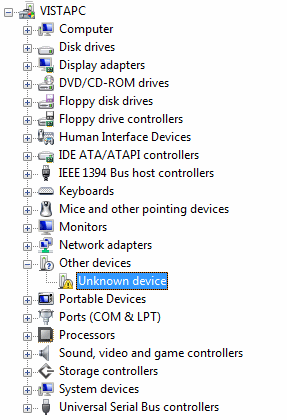
The Device Manager (available in the Control Panel) shows the detected
devices and the installed device drivers.
The items with a yellow exclamation mark are the unknown devices, which need a
device driver to function, which can be downloaded from the website of the
manufacturer (or on one of the CD's belonging to the computer). Check the
website of the manufacturer for an update of the device drivers, even if Windows
has recognized the device by default. Most downloaded drivers will install automatically by
running a setup procedure and reboot the computer. If this is not the case, the
manual will explain how to install the drivers.
|
|
Track unknown hardware with CPU-Z
If it's not clear which device drivers need to be installed for the motherboard?
In most cases, the information stored in the BIOS can be of help by tracking the
exact type of motherboard and the therefore needed device drivers. To find out
the type of motherboard, the free tools CPU-Z (download:
www.cpuid.com/cpuz.php) and PC Wizard (download:
www.cpuid.com/pcwizard.php) are very usable. CPU-Z shows quickly the
type of processor, motherboard and RAM-memory, and PC Wizard shows a
list of all the devices. This information is of great help to search the
internet for the device drivers of still unknown hardware.
Limit the number if tray icons
Many programs and drivers place an icon in the system tray. In most cases they
are unnecessarily filling the available space, especially when the icon is
rarely used. In that case, it is better to remove the shortcut from the system
tray. Frequently, this can be done at setup (the option is recognized by
something like (system) tray-icon) or just by right clicking the icon in the
system tray and to search for an option to disable it.
THE USE OF WINDOWS XP-DRIVERSFor older hardware, there are not always Windows Vista drives available. In some cases, this can be solved by installing the Windows XP drivers. The message that the driver has not been signed by Microsoft for Windows Vista can be ignored. |
RESTORING THE PREVIOUS DEVICE DRIVERInstalling a new device driver is not risk free and new device drivers do not always function better. In those cases, the previous driver can always be restored by right clicking the device in the Device Manager and to select Properties, tab Driver, button Roll Back Driver. If the computer continuously restarts it is not possible to roll back the device driver. This circle can be broken by pressing F8 at the beginning of the boot process and to select Disable automatic restart on system failure. |
© 2001-2022 - Menno Schoone - SchoonePC - Rotterdam - The Netherlands