AVG: free antivirus software to download
If you don't want to pay for a yearly subscription for your virus scan
updates, there is always free antivirus software available! AVG Anti-Virus Free Edition
(download: free.grisoft.com)
is one of them. The AVG Anti-Virus setup is straight forward, with a few
clicks en updating of the virus definitions, your Free AVG software is
ready. You need to register, after registration you receive an e-mail with the
registration code.
Advantages AVG Free antivirus: easy virus definition update
Disadvantages AVG Free antivirus: doesn't recognize all viruses (personal
experience)
See the pages
Free Avast and
Free AntiVir
for other free antivirus software.
Installing and setting up the free AVG virus scan software
After downloading AVG Free Anti-Virus (download: free.grisoft.com),
the installation procedure is quite simple (but first remove any earlier
version of AVG!). After accepting the Acceptance Notice and the License
agreement, the installation of AVG continues. The window for activating the AVG Free License
(the license for the free use of the virus scan software has been filled in by
default (a username is not necessary). In the next window, you are asked to
install the AVG Security Toolbar, new in AVG: disable this toolbar, in
the free version of AVG it's not useful.
TIP: Is the toolbar AVG Security Toolbar
already installed? The toolbar can be disabled in the Internet Explorer by
Tools, Internet Options, tab Programs, button Manage
add-ons
(for Firefox:
Tools,
Add-ons,
button Disable for AVG
Safe Search). Disabling the option
LinkScanner in the main AVG Window has no effect.
WHY DISABLING THE AVG SECURITY TOOLBAR?
Grisoft advises to install the
AVG Security Toolbar to improve safely browsing the internet: the toolbar
verifies websites whether they are safe before they are shown in the browser.
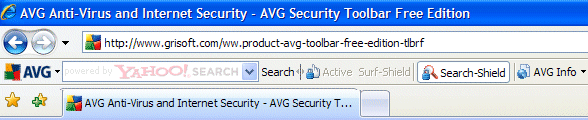
The additional security offered by this toolbar is split into the
Search-Shield (verifies the build in Yahoo!-search results) and the
Active Surf-Shield (a real-time protection of visited websites). The free
version only uses the
search-Shield while the Active Surf-Shield is disabled. For this
reason, it is better to disable this toolbar at setup (option
Yes, I would like to install the AVG Security Toolbar)!
|
The first time AVG runs
The first time AVG runs, the program asks several settings to confirm. In
step 2 the automatic daily virus scan can be changed or disabled (by disabling
the option Enable daily scanning). The other steps are not relevant for
the use of AVG and can be confirmed with the button Next. The setup of
AVG is concluded with a check for the latest virus definitions.
Optimizing the AVG settings
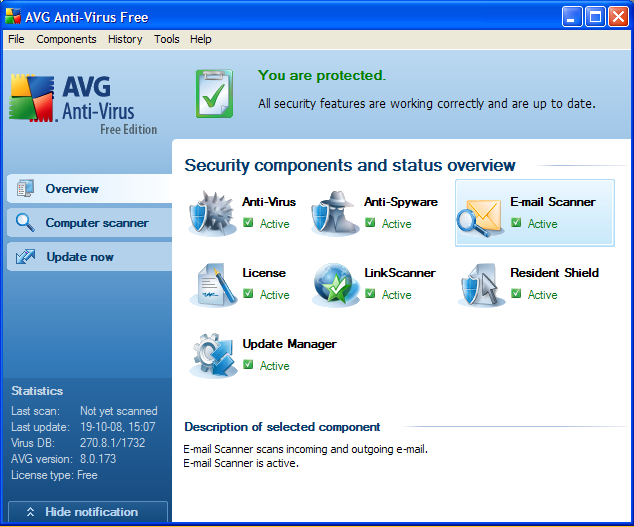
The most relevant settings can be changed in the main AVG Anti-Virus Free
window (available by double clicking the AVG-icon in the system tray):
Scanning the hard disk for viruses
Besides a permanent real-time scan for the running processes, all files on
the hard disk are daily scanned for viruses on a preset time.
These default scan settings can be changed by the main AVG window, Tools, Advanced settings, tab Schedules
(in the left pane), sub tab Scheduled scan. Here, the scheduled time can be
changed to a more favorite time when the computer is usually on but not used. By
choosing for a specific day (see example), the daily scan can be changed to a
weekly scan (for normal use, a daily scan is not necessary).
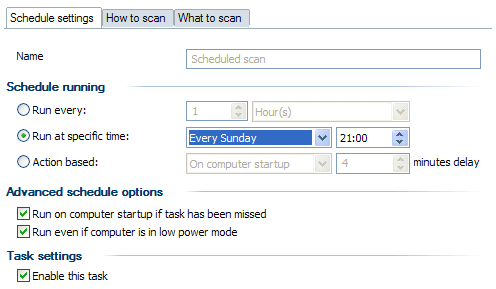
In case of the default settings, the automatic scan for viruses is skipped
when the computer is not turned on (or in sleep) at the specific time. Therefore,
it's wise to activate the options Run on computer startup if task has been missed
and Run even if computer is in low power
mode, to make sure AVG will do the scan when the computer has just been
turned on or has just came out of a lower power mode.
Disabling the option Enable this task disables the scanning of the
hard disk for viruses. If the automatic scan for viruses is disabled, don't forget to do it manually
from time to time! The manual scan of the hard disk (or specific parts of the
hard disk) is started by the tab Computer scanner in the main AVG windows,
option Scan whole computer (or Scan specific files or folders).
Although the default settings are fine, the scan settings can be changed by the
option Change scan settings.
TIP: On the tab What to scan, it
is possible to make a selection of the partitions and folders to scan, which
will improve the time to finish the scanning process. Specific partitions,
folders and/or files can be scanned manually in the Windows Explorer by right
clicking them and to select Scan with AVG Free. This is a useful
option to quickly scan newly added files for viruses and spyware!
Files stored in the Virus Vault
Files which are suspected to be infected with a virus or spyware are placed
in the Virus Vault. These files can be found with the button View
Virus Vault of the tab Computer scanner in the main window. Here, the wrongfuly recognized
files as a virus
or spyware (the false positives), can be restored to their original location.
After 30 days, the files in the Virus Vault are deleted. The Virus
Vault settings can be changed by Tools,
Advanced settings, tab Maintenance, sub tab Virus Vault. By disabling the option Automatic file deletion,
it is possible to deactivate the automatic deleting of files.
Updating AVG virus definitions
The updating of the virus definitions is done automatically.
The specific time on which the updates are downloaded can be changed with the
option Update Manager in the main window of AVG Anti-Virus Free (choose
a time on which the computer is normally turned on). The free version can only
check for updates once a day, on a specific time.
If the computer is not active, there will be no updating of the virus
definitions! That's why it's wise to activate all the options on the sub tab Virus database update schedule
(Tools in the toolbar, Advanced settings, tab Schedules
(in the left pane), to make sure the latest available virus definitions are
installed when the computer is active.
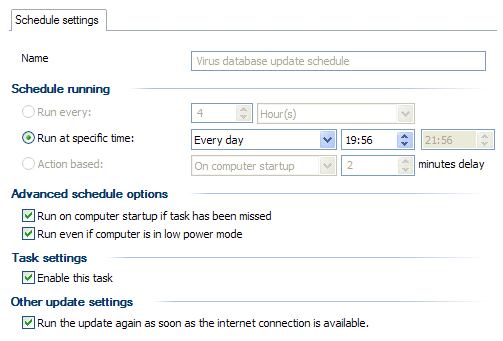
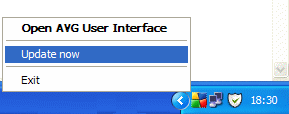
Updating virus definitions is done automatically. To do a check for virus
definition updates your self, right click the AVG icon and select Update now. Furthermore, the check for updates, download and installation of
the new virus definitions is straight forward.
Disabling the certification of e-mail
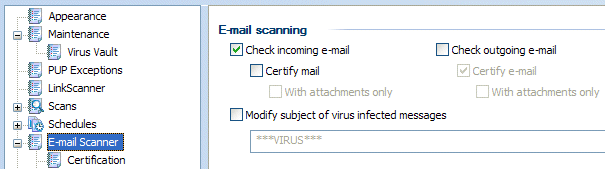
Because e-mail is certified by AVG, all incoming and outgoing e-mail will
show a certification at the end of the e-mail message. This looks more like an
add, than it is useful. That's why I prefer to disable the option to
certify e-mail. This is done by disabling the option Certify mail (for
both the incoming and outgoing e-mail) in the menu bar, Tools, Advanced settings, tab E-mail Scanner (at
the left pane).
I prefer to
disable the option Check outgoing e-mail as well (this option gives big
problems in Norton AV: presumed send e-mail which is not send at all).
Adding folders to the list of exceptions
Folders which don't contain dangerous files, they can be excluded from the
scanning proces by adding them to the exceptions of the resident shield. This is
done by Tools, Advanced settings, tab Resident Shield (at
the left pane), subtab Exceptions, button Add Path. Especially
when AVG comes up with a false positive and places it automatically in
quarantaine (like the tools for finding a password).
© 2001-2022 - Menno Schoone - SchoonePC - Rotterdam - The Netherlands